
Tell everyone without chains
A last-minute venue change was a WhatsApp chain that never reached half of them.
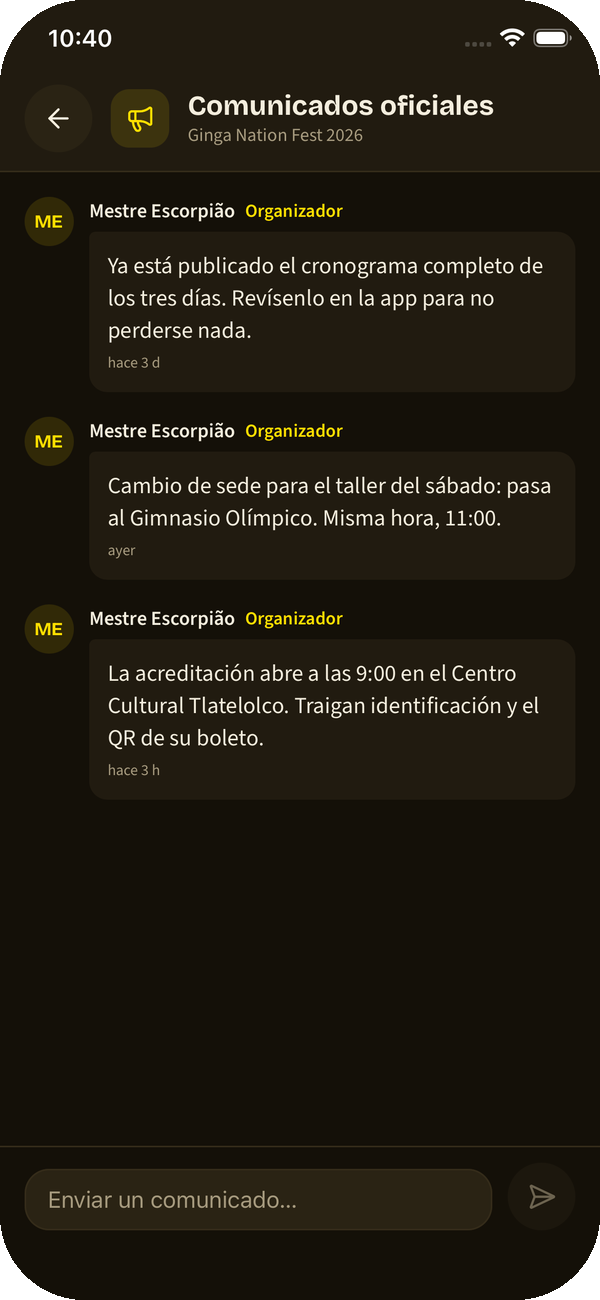
You post the announcement once and it reaches every registered attendee, with a notification on their phone. And it stays on the wall for whoever reads it later.
How it works
From writing the announcement to knowing it landed.
-
Write the announcement
You write it from the app, in the event it belongs to. No lists to build, no numbers to copy.
-
It reaches the registered
Everyone registered for your event gets the notification on their phone. It does not depend on someone forwarding it.
↔ The attendee gets the announcement even without the app open.
-
It stays on the event wall
Whoever reads later finds it there, with the previous ones in order. An announcement stops getting lost because it arrived mid-class.
↔ The attendee opens the event and sees every announcement, not just the last one.
-
And they can talk there
The wall also lets attendees ask questions and sort things out among themselves, in the same place the announcements are.
Worth knowing
- The announcement goes to that event’s registered attendees, not to everyone: people who are not going get nothing.
- Official announcements are distinguishable from what attendees write.
- Your groups also have their own wall, separate from each event’s.
- The same announcement can be posted from the web dashboard.
More features
The rest of what the app already solves today.
- Your guests, in one thread The deal with each guest mestre got lost among old conversations.
- Your ticket, in Wallet No more digging for the payment screenshot in your gallery while the queue moves.
- Your school’s books Payments arrived as WhatsApp screenshots and by month’s end nobody knew who still owed.
- Your group’s cords Graduations lived in a notebook, and at the batizado nobody remembered who was ready.
- Promote your event from your phone Your batizado lived in an Instagram story that expired in twenty-four hours.
- Run your event without the chaos Registrations came by chat, payments by screenshot and the schedule in a PDF nobody opened.
- Your trial classes, with follow-up Someone asked about a trial class, you replied, and that was the end of the story.
- Find events and rodas Events lived in Instagram stories, and you found out once they had already happened.
Make your next announcement land
The platform is free while we are in beta.